

What is smishing?
Smishing is phishing by text message. A scammer sends a message that appears to come from a person or organization you trust. The goal is to get you to click a harmful link, visit a fraudulent website, send money, or share information such as a password, pin, sign-in code, or banking details.
A message can even appear in the same conversation as legitimate texts from your bank or another trusted organization. A familiar sender name or message thread is not proof that the text is real.
Common smishing messages
| Message type | What it may say |
| Package delivery | “We could not deliver your parcel. Pay a small fee to reschedule” |
| Bank or account alert | “Your account has been locked. Verify your identity now.” |
| Government payment or refund | “You are eligible for a rebate. Claim your payment today.” |
| Unpaid bill, toll, or fine | “Final notice: pay now to avoid additional charges.” |
| Friend, family member, or employer | “Hey, I need you to send money right away, I’m in trouble.” |
| 
| 
|
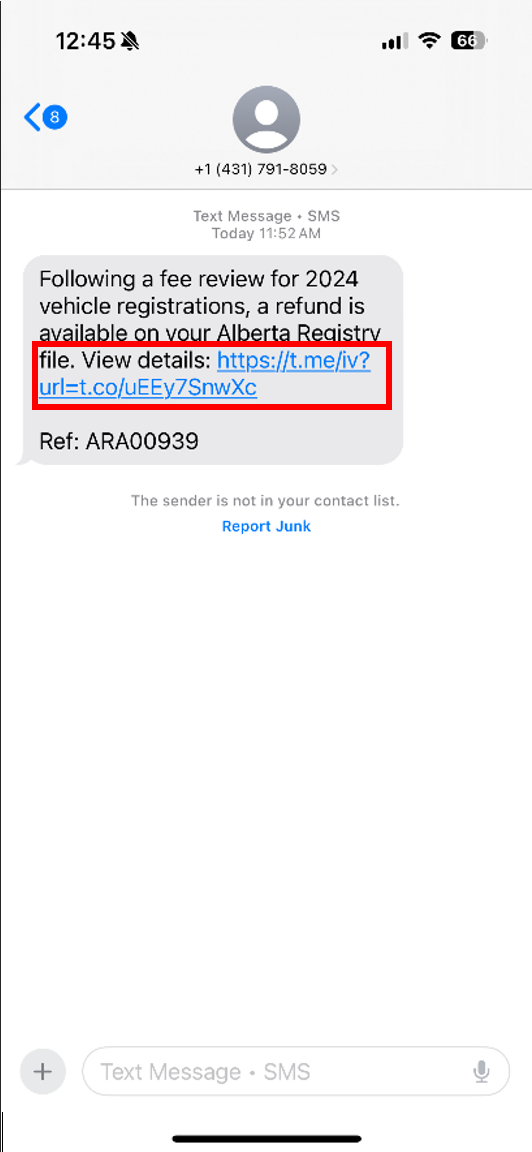
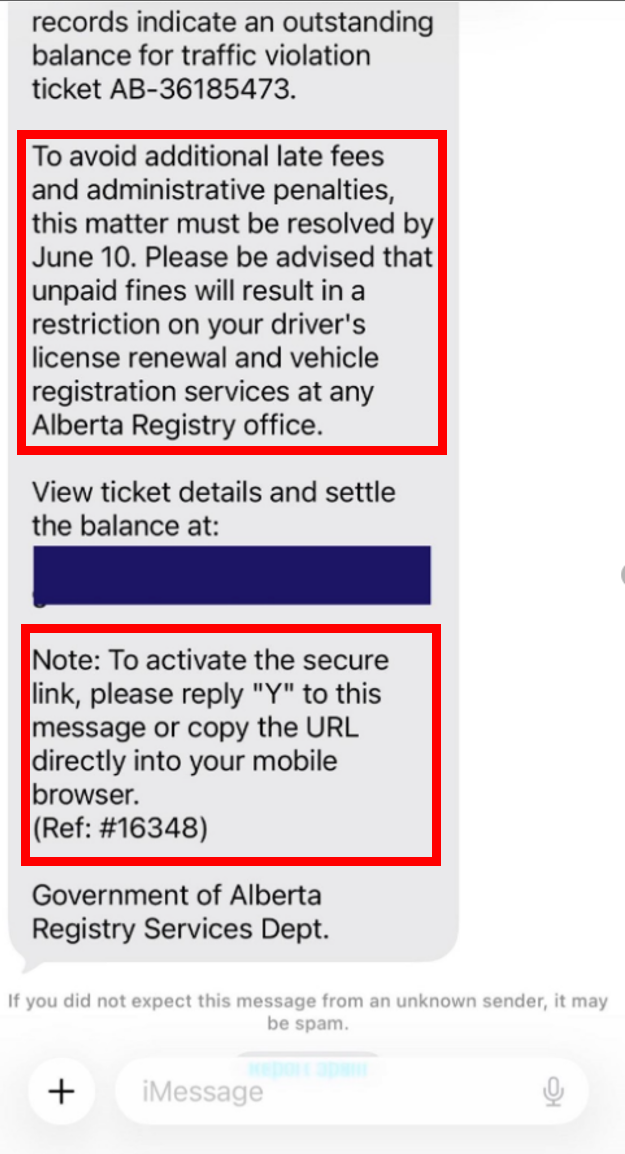
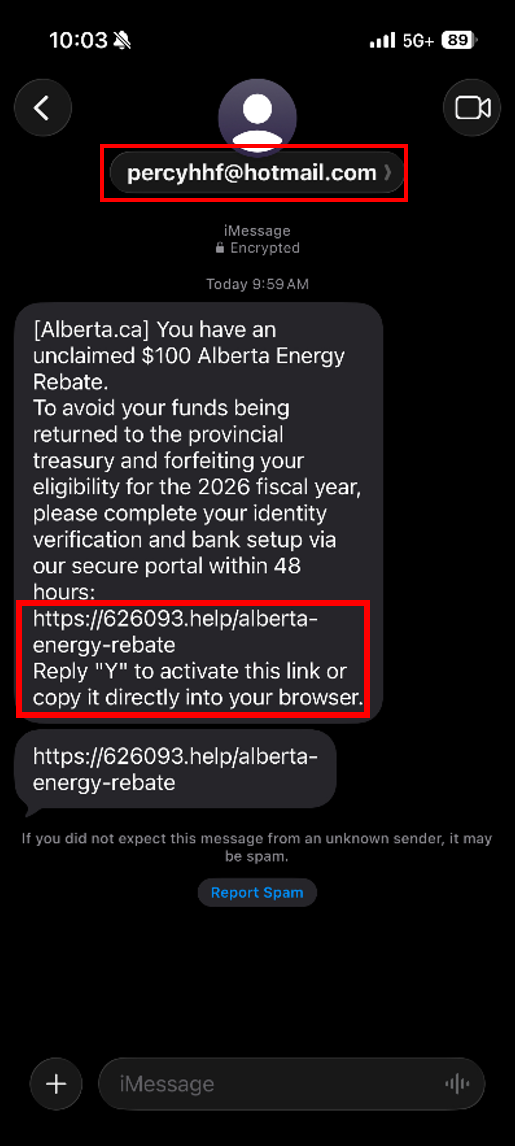
| Screenshot of a text message claiming a vehicle registration fee refund is available. The message includes an unfamiliar shortened web link, a common tactic used to hide the true destination of a scam website. | Screenshot of a text message claiming an outstanding traffic violation must be resolved immediately. The message create urgency with threats of penalties and asks the recipient to reply to active a link, which is not a normal process for legitimate government services. | Screenshot of a text message claiming the recipient is eligible for an Alberta energy rebate. The message appears to come from a personal email address instead of an official government account and requests identity verification through a suspicious website. |
Spot the warning signs
- Pressure to act now, before you have time to think.
- A link that is shortened, misspelled or different from the organization’s official address.
- A request for a password, PIN, Social Insurance Number, banking information, or multi-factor authentication code.
- A promise of a refund, benefit, prize, or payment you were not expecting.
- A threat that an account, service or delivery will be suspended.
- An unexpected request to send money, buy gifts or move a conversation to another app.
- Awkward wording, unusual formatting, or a greeting that does not fit the situation.
| A polished message can still be a scam. Artificial Intelligence (AI) makes it easier then ever for scammers to copy brands and spoof sender information (e.g. emails and phone numbers). Do not rely on spelling, logos, or the displayed contact information. |
What to do when you receive a suspicious text

| Do not tap. Do not open the link, download a file, call the number, or reply. |

| Verify it yourself. Contact the organization or individual using a trusted phone number or contact method you found independently. |
|
| Report the text. Use your phone’s spam-reporting feature or forward the message to 7726 (SPAM). Then block the sender and delete the message. |
|
| Inform the impersonated individual or organization. Many organizations including government and banks have their own fraud-reporting channels. Use the organization’s official website to find them. |
Make it a habit to pause and verify
Smishing works when a message gets an immediate reaction. Give yourself time. If the request is real, it will still be there after you check it through a trusted source.
Before you tap, ask:
• Was I expecting this?
• Is the message pushing me to act?
• Can I verify it using an app, website, or phone number I already trust?
If you clicked a link, replied, or shared information
Act quickly, but do not panic. What you do next depends on what you shared or what happened.
- Contact your bank or financial institution right away if you sent money or shared payment information.
- Change your passwords and use a unique password for each account.
- If you shared a sign-in or verification code, contact the account provider (ex. Bank, streaming site, etc.) and review recent account activity.
- Save copies or screenshots of the text, website, receipts, and transaction details.
- Contact your local police if you lost money, your identity has been used, or you need an incident file number.
- Report the incident to the Canadian Anti-Fraud centre, even if you did not lose money.
Reporting and support for Albertans

| CALL 911 IF THERE IS AN IMMEDIATE THREAT TO YOUR SAFETY |
Report a Scam | |
Canadian Anti-Fraud Centre Report text message scams, fraud attempts, identity theft, and financial scams. Reporting helps authorities track scam trends and warn Canadians. | Equifax Canada & TransUnion Canada If you shared personal information, monitor your credit report and consider placing a fraud alert on your credit file. Visit Contact Us | Equifax Canada Visit OCS Home |
Local Police Department Contact your local police’s non-emergency number if you suffered financial loss, identity theft, extortion, or believe a criminal offence has occurred. | Bank or Credit Union Contact your financial institution immediately if you click a malicious link, shared banking information, or authorized a payment. |
Stay Informed | |
Canadian Centre for Cyber Security Find easy-to-understand information on scams, fraud, online safety, privacy, passwords, and more from the federal government’s cybersecurity experts. | Government of Alberta – Fraud Find information on common frauds affecting Albertans. Visit Fraud | Alberta.ca |
CyberSafe Training Modules Explore short cyber safety courses that help build safer online habits, recognize common threats, and protect your personal information. Visit CyberSafe | CyberAlberta | CyberAlberta Community of Interest Connect with Alberta’s cybersecurity community to stay informed about emerging threats, share knowledge, discover events, and access cybersecurity intel from across the province. |
Share a Scam
Help protect other Albertans. Send suspicious text messages (smishing) and other fraud examples to CyberAlberta to help identify emerging scams.
Email: [email protected]
