CAA-2026-0018 Device Code Phishing Attacks Abuse Legitimate Authentication Methods to Bypass MFA
This report is distributed as TLP:CLEAR. Recipients may share this information without restriction. Information is subject to standard copyright rules.
Summary
Since 25 March 2026, CyberAlberta Threat intelligence observed phishing attacks targeting the OAuth Device Code authentication method. This authentication method was created for input-constrained devices but has been increasingly abused by threat actors primarily for its ability to evade detection and bypass multi factor authentication (MFA). The quick adoption of this technique has been aided by multiple Phishing-as-a-Service (PhaaS) kits enabling threat actors to facilitate account takeover attacks.
Details
OAuth Device Code authentication allows input-constrained or browser-less devices—smart TVs or printers—a convenient method to delegate authentication.1 The primary device displays a code for the user to enter on a secondary device that is not input-constrained, such as a laptop or smartphone. The user completes the authentication process by inputting the corresponding Device Code on the secondary device, thus granting access tokens for the primary device.2 Device Code authentication is also used to authenticate command-line interface (CLI) tools like Azure CLI.
Threat actors can target the Device Code authentication process through phishing attacks and also bypass MFA controls.3 Typically, the phishing lure directs users to a malicious site and instructs them to perform a Device Code authentication with a legitimate identity provider, such as Microsoft Entra or Google Identity. The lures typically impersonate popular services such as Microsoft SharePoint, Adobe Acrobat, or DocuSign with themes such as document reviews, meeting invites, and voicemail notifications. Threat actors can obtain the access token if the authentication is completed, granting access to the account without ever needing to harvest credentials.4
Resource Development
Since 25 March 2026, CyberAlberta Threat Intelligence observed three Device Code phishing attacks. Two of these attacks originated from compromised email accounts belonging to Alberta-based organizations. Compromised legitimate email accounts often allow threat actors to bypass email security filters and exploit trust to increase phishing engagement. The third Device Code phishing email was sent from Kagoya[.]net—a Japanese-based cloud services provider, often abused by threat actors.5
In one attack, a threat actor used Brevo[.]com’s URL redirection service to mask the URLs of attacker-controlled domains hosting Device Code phishing content. In this same attack, an IP address owned by Railway[.]com (AS400940)—an infrastructure-as-a-service cloud platform—was abused to perform the authentication attempts. According to Huntress analysts, the EvilTokens PhaaS kit frequently abused Railway’s infrastructure to perform authentication attempts.6 EvilTokens was recently discovered by Sekoia’s Threat Detection & Research (TDR) team who note Canada have been one of the most heavily targeted countries by Device Code phishing attacks using EvilTokens.7
The remaining Device Code phishing pages were hosted on either likely compromised domains or Amazon S3 infrastructure. Authentication attempts associated with these campaigns were also observed from Hetzner IPs (AS213230).
Initial Access
All observed phishing emails contained links to the Device Code phishing pages embedded directly within the email body (Figure 1). In one instance, the phishing link masqueraded as a direct link to a PDF file and sent self-addressed with the targets BCC’d. The remaining phishing emails impersonated Microsoft SharePoint and Adobe document requests. These messages included links claiming to be for document review that led to Device Code phishing pages.
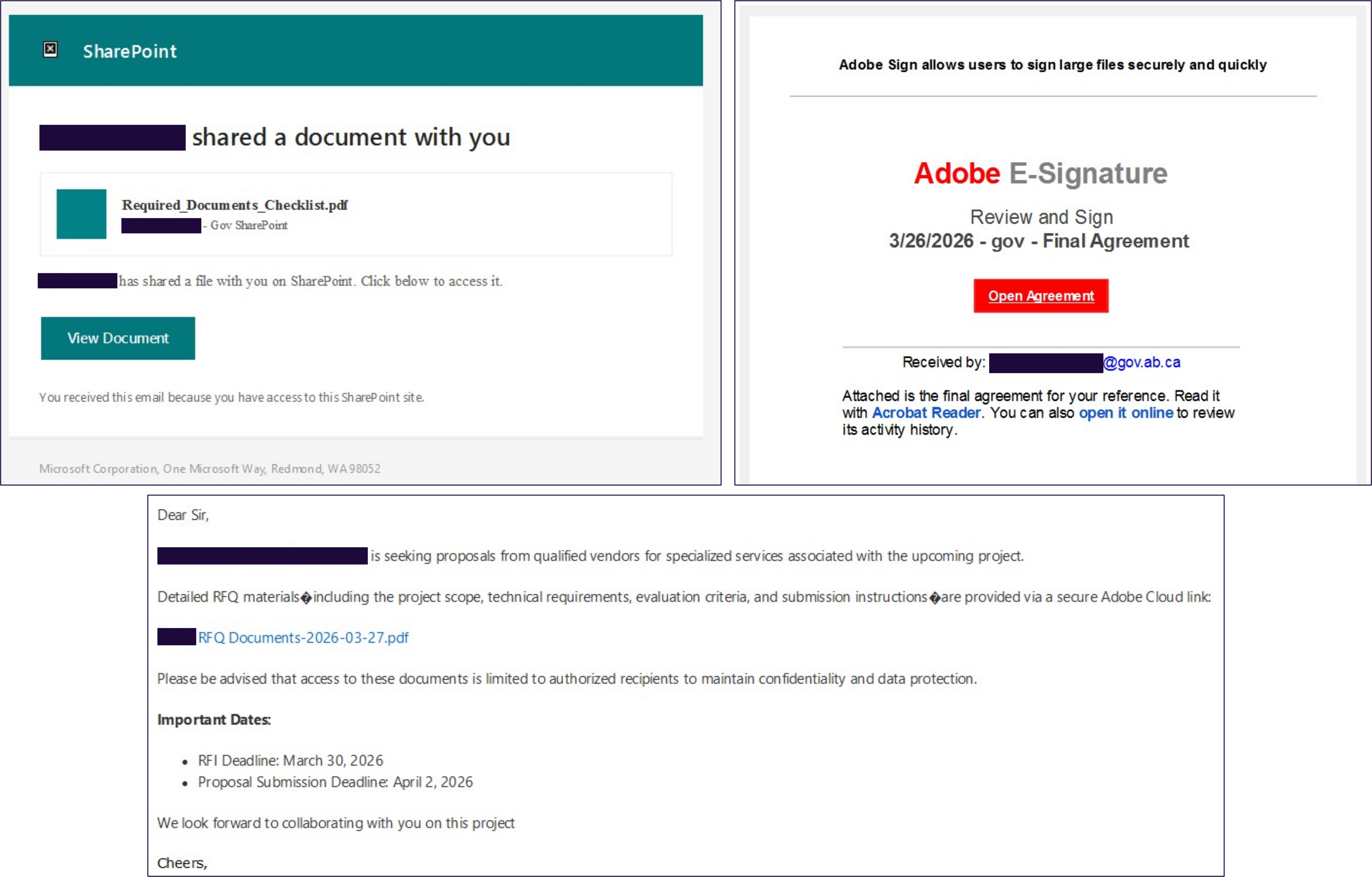
Figure 1. Observed Device Code Phishing Emails
Execution
After following the phishing links, victims were presented with a Device Code authentication prompt (Figure 2). In the two observed cases available for analysis, users were instructed to copy the displayed Device Code and follow a provided link, initiating Microsoft’s Device Code authentication process. Some Device Code phishing pages first prompted users to complete human verification before displaying the Device Code.
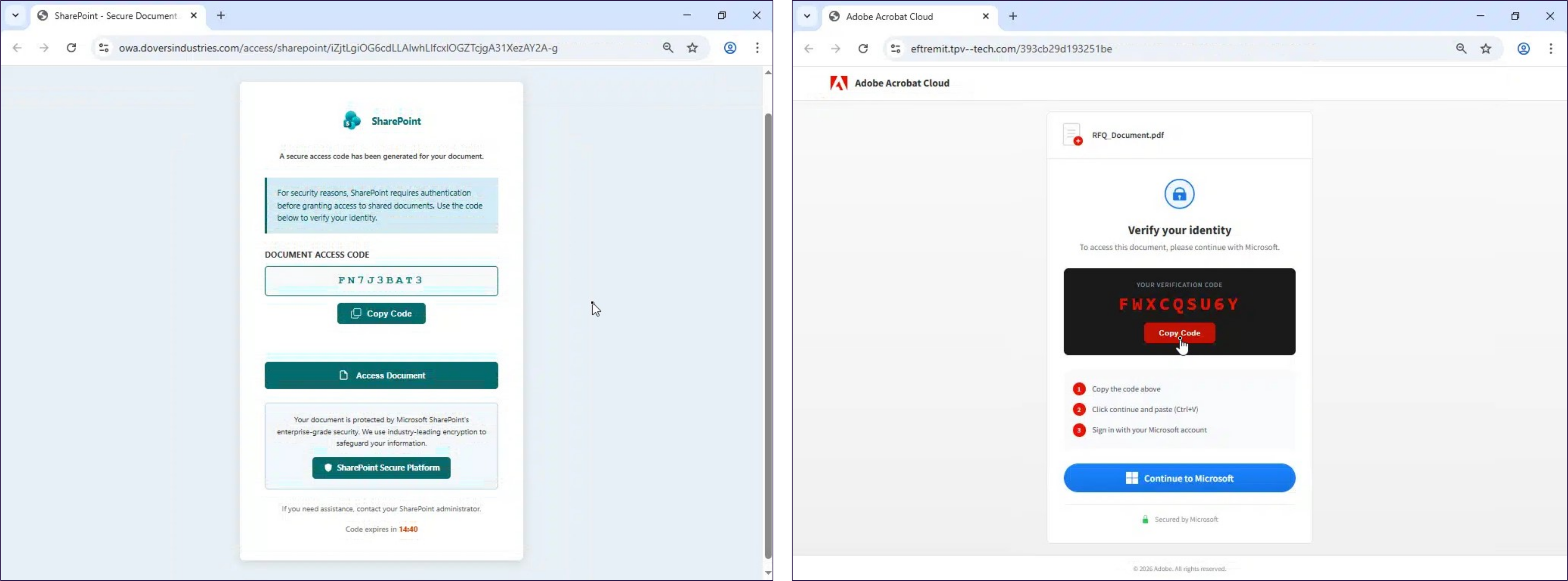
Figure 2. Observed Device Code Phishing Landing Pages
Defense Evasion
If a user follows the provided authentication link, a browser pop-up window is launched for the legitimate Microsoft Device Code authentication endpoint (login.microsoftonline.com/common/oauth2/deviceauth). Users are then prompted to enter the provided Device Code.
Depending on the session state, users may be required to authenticate by entering their credentials and completing MFA. However, if an active session already exists, providing the Device Code and selecting an account are the only steps required.
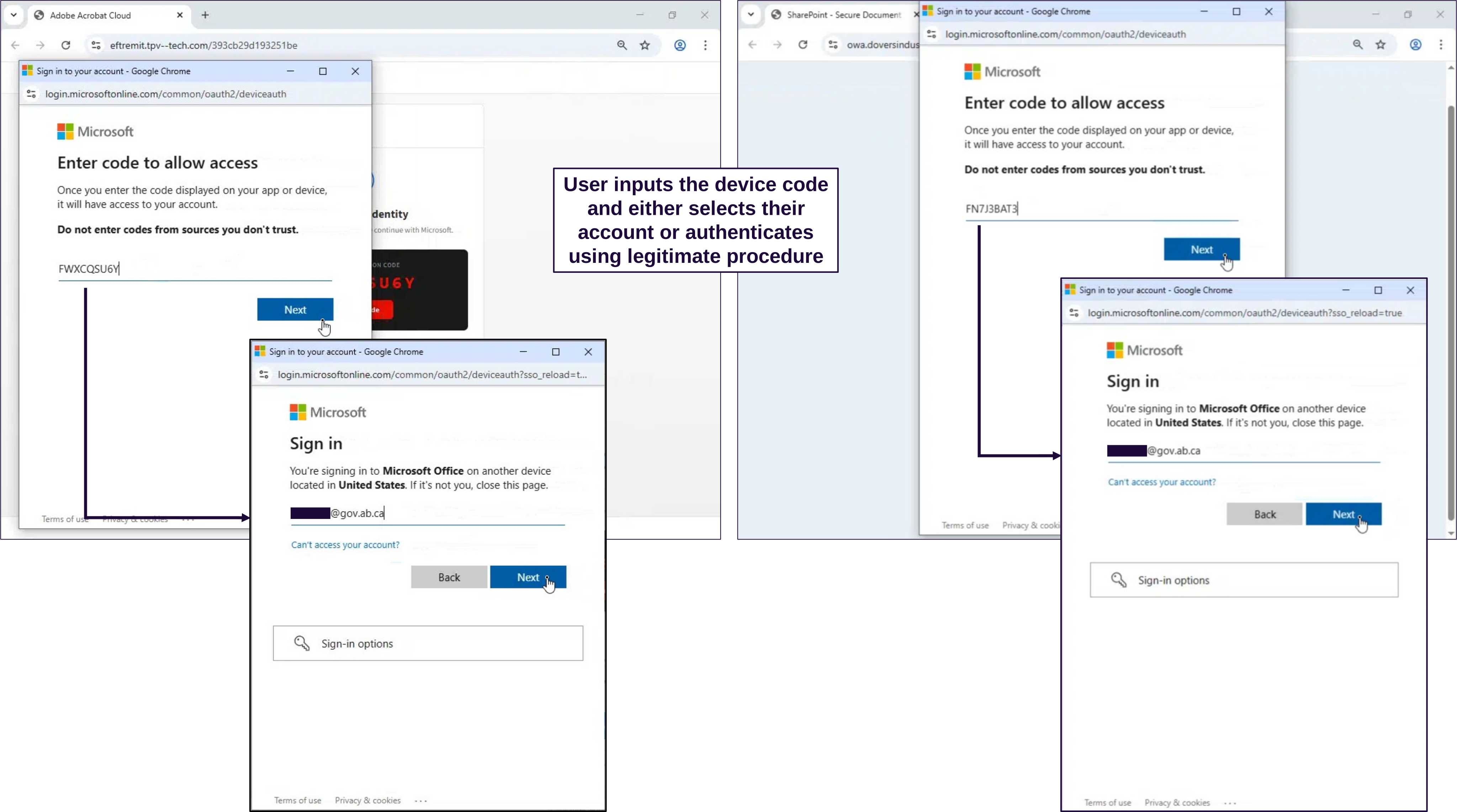
Figure 3. Example of a Microsoft Device Code Authentication
Credential Access
Access tokens for the victim’s session are generated once authentication is complete. The threat actor can retrieve these tokens by submitting the corresponding Device Code to the appropriate API endpoint. In Device Code phishing attacks that abuse Microsoft’s Device Code authentication, the threat actor polls the /oauth2/v2.0/token endpoint with the corresponding Device Code to obtain both an access_token and a refresh_token.
The access_token enables access to the victim’s account, whereas the refresh_token remains valid for 90 days. The refresh_token provides persistent access and can be used to register new devices and obtain a Primary Refresh Token (PRT). Possession of a PRT enables lateral movement by granting Single-Sign-On (SSO) access to other applications available to the compromised account.
Impact
Of the observed Device Code phishing attacks, one resulted in a threat actor successfully obtaining a PRT for the affected user account. This compromise was automatically identified through existing detection rules for authentication attempts containing an Axios user agent (axios/1.13.6).
Assessment
CyberAlberta Threat Intelligence assesses that threat actors are highly likely to continue abusing Device Code and other legitimate authentication mechanisms, such as OAuth redirects, to conduct account takeover attacks.89 This assessment is supported by industry reporting that identified a growing commercial market for related phishing kits capable of abusing legitimate authentication workflows. On 4 April 2026, Push Security identified at least ten distinct phishing kits for sale. Sekoia analysts noted the developers of EvilTokens PhaaS kit planned to offer new capabilities enabling Gmail and Okta themed attacks.
Recommendations
To defend against Device Code phishing attacks, organizations should:
- Disable Device Code authentication wherever possible.
In Microsoft Entra, a policy can disable Device Code authentication; or configure it in “Report-only” mode initially to assess the impact prior to disabling.10
Additionally, Microsoft recently announced a default policy to block Device Code authentication for customers that have not used it in 25 days.11
- For environments that require Device Code authentication, monitor for Device Code authentications performed from anomalous locations, unusual user agents, or from non-compliant devices.
Revoke all access tokens and any maliciously created mailbox rules for any affected user accounts.
- Ensure Continuous Access Evaluation (CAE) is enabled so revocation of access tokens occurs in near real time.12
Detection Opportunities
The following KQL queries can help detect the Device Code phishing activity described in this report.
union SigninLogs, AADNonInteractiveUserSignInLogs | where AuthenticationProtocol == "deviceCode" or OriginalTransferMethod == "deviceCodeFlow" | project TimeGenerated, UserPrincipalName, SessionId, AuthenticationProtocol, OriginalTransferMethod, ResultSignature, IncomingTokenType, AppDisplayName, AppId, ResourceDisplayName, ResourceId, ClientAppUsed, Location, IPAddress, UserAgent | sort by TimeGenerated desc |
Figure 4. KQL Query to Detect Device Code Authentication Events
let Railway_IPv4_Subnets = dynamic (['66.33.22.0/23', '162.220.232.0/22', '208.77.244.0/22']); let Railway_IPv6_Subnets = dynamic (['2607:99c0::/38']); EntraIdSignInEvents | where ipv4_is_in_any_range(IPAddress, Railway_IPv4_Subnets) or ipv6_is_in_any_range(IPAddress, Railway_IPv6_Subnets) | project TimeGenerated, AccountUpn, SessionId, LogonType, EndpointCall, ErrorCode, Application, ApplicationId, ResourceDisplayName, ResourceId, ClientAppUsed, DeviceName, IsManaged, IsCompliant, UserAgent, Browser, IPAddress, Country, State, City | sort by TimeGenerated desc |
Figure 5. KQL Query to Detect Authentications from Railway IPs
Indicators of Compromise (IOCs)
The following Indicators of Compromise (IOCs) characterize the Device Code phishing activity described in this report.
| Description | Indicator |
| Brevo redirect domain | mmux8.r.ag.d.sendibm3[.]com |
| Device Code phishing domains | owa.doversindustries[.]com |
| eftremit.tpv--tech[.]com | |
| 49-qwer-hyper-552df-raven-931-5p.s3.us-east-1.amazonaws[.]com | |
| auth.loadingdocuments[.]uk | |
| Hetzner IPv4 address hosting Device Code phishing page | 178.156.184[.]138 |
| Hetzner IPv6 address performing authentication | 2a01:4ff:f0:6e0b:[:]1 |
| 2a01:4ff:1f0:dab9:[:]1 | |
| User agent performing authentication | Mozilla/5.0 (Windows NT 10.0; Win64; x64) AppleWebKit/537.36 (KHTML, like Gecko) Chrome/146.0.0.0 Safari/537.36 Edg/146.0.0.0 OS/10.0.22631 |
| Mozilla/5.0 (Windows NT 10.0; Win64; x64) AppleWebKit/537.36 (KHTML, like Gecko) Chrome/146.0.0.0 Safari/537.36 Edg/146.0.0.0 OS/10.0.26100 | |
| Go-http-client/2.0 | |
| axios/1.13.6 |
Table 1. Device code phishing IOCs
MITRE ATT&CK
The following table maps tactics, techniques, and procedures (TTPs) described in this report to the MITRE ATT&CK Framework.
| Tactic | Technique | Observable |
| Resource Development | T1583.001 - Acquire Infrastructure: Domains | Device Code phishing pages were hosted on newly registered domains |
| T1583.003 - Acquire Infrastructure: Virtual Private Server | Malicious authentication attempts were observed from Hetzner IP addresses | |
| T1583.006 - Acquire Infrastructure: Web Services | Device code phishing pages were hosted on Amazon S3 bucket URLs | |
| T1583.007 - Acquire Infrastructure: Serverless | Malicious authentication attempts were observed from Railway IP addresses | |
| T1584.001 - Compromise Infrastructure: Domains | Device code phishing pages were hosted on likely compromised domains | |
| T1585.002 - Establish Accounts: Email Accounts | Device code phishing emails were delivered using Kagoya’s email service | |
| T1586.002 - Compromise Accounts: Email Accounts | Device code phishing emails were delivered by compromised email accounts owned by organizations based in Alberta | |
| Initial Access | T1199 - Trusted Relationship | Threat actors delivered subsequent Device Code phishing emails to target contacts found in compromised email accounts |
| T1566.002 - Phishing: Spearphishing Link | Links to Device Code phishing pages were placed in email bodies | |
| Execution | T1204.001 - User Execution: Malicious Link | Users initiate the Device Code phishing attack after interacting with the link placed in email bodies |
| Defense Evasion | T1550.001 - Use Alternate Authentication Material: Application Access Token | Threat actors use access tokens for applications such as Microsoft Office generated by victims completing the Device Code authentication process on their behalf |
| T1656 - Impersonation | Lures contained in Device Code phishing emails and the subsequent Device Code phishing pages impersonated trusted services such as Microsoft SharePoint and Adobe | |
| Credential Access | T1187 - Forced Authentication | Threat actors attempted to force targets through the legitimate Device Code authentication process using a Device Code known to the threat actor which they can use to intercept the corresponding access tokens |
| Impact | T1531 - Account Access Removal | A compromised user temporarily lost access to their account due to the necessary remediation actions |
Table 2. Device Code Phishing TTPs